King Air C90A
(Model C90B)
Takeoff Landing Enroute
W&B Main
This weight and balance program is similar to all the other
AFM Solutions programs.
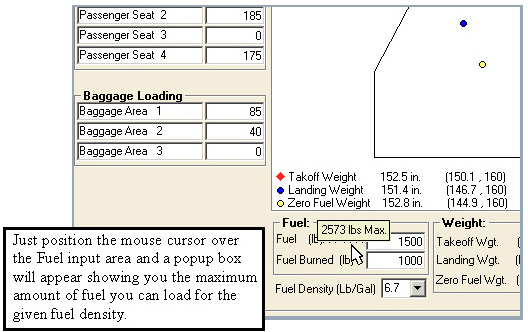
A special feature found in the King Air W&B section is the ability to select fuel
density.
Since fuel weight varies with fuel density your maximum fuel
weight allowed can be seen
By placing the mouse cursor over the Fuel box as seen below
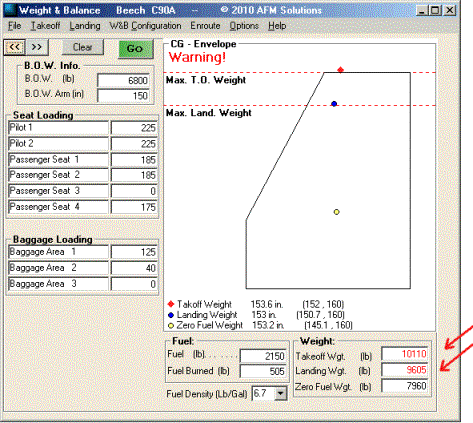
As always, if one or more of the computed quantities are
outside the allowed range
a red “Warning!” label appears near the top of the screen.
The quantities exceeding
the limits are displayed in red, in this case the takeoff
weight and the landing weight
are higher than the maximum allowed.
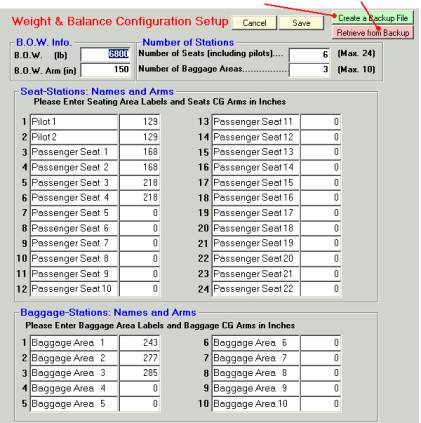
When upgrading your software, the current version needs to
be uninstalled and
a newer version then needs to be installed on your computer.
To prevent your
current aircraft configuration from being replaced with the
new generic one you
have the option of creating a backup file before
uninstalling the program. Upon
installing the new version you can restore your saved data
with one click. The
backup and restore buttons are shown below
Backup Restore
Copyright
© 2009-2010 AFM Solutions